This override allowed us to turn this functionality on
Source Material:
Introduction
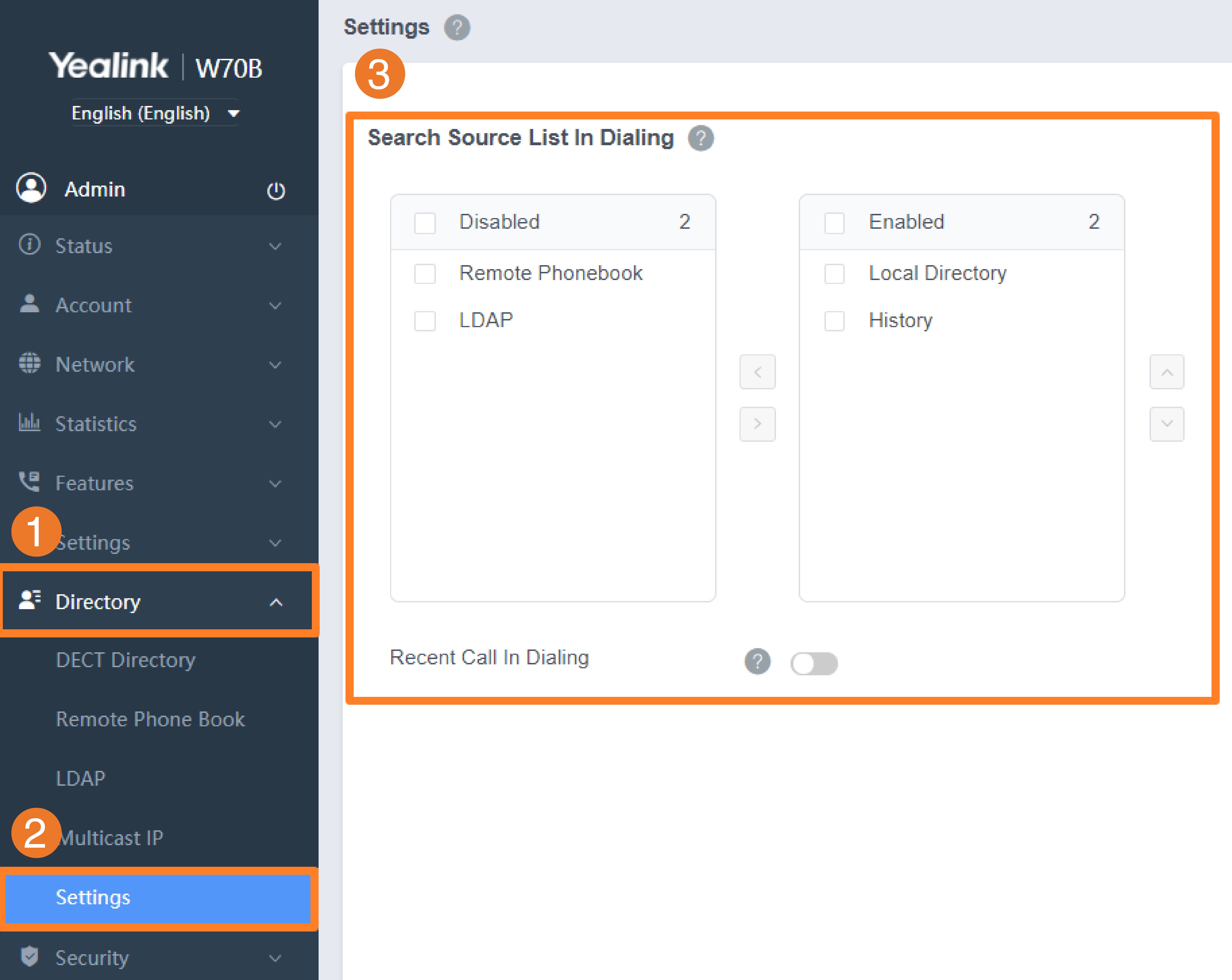
The search source list in dialing allows you to search entries from the source list when the phone is on the pre-dialing/ dialing screen. You can select the desired entry to dial out quickly.
The search source list can be configured using a supplied super search template file (super_search.xml).
Search Source File Customization
You can ask the distributor or Yealink FAE for super search template. You can also obtain the super search template online: http://support.yealink.com/documentFront/forwardToDocumentFrontDisplayPage.
Search Source File Attributes
The following table lists the attributes you can use to add source lists to the super search file:
| Attributes | Valid Values | Description |
|---|---|---|
| id_name | local_directory_searchcalllog_searchremote_directory_searchldap_searchBroadSoft_directory_search | The directory list (For example, local_directory_search for the local directory list).CAUTION Do not edit this field. |
| display_name | Local Contacts History Remote Phonebook LDAP Network Directories | The display name of the directory list. NOTE We recommend that you do not edit this field. |
| priority | 1 to 5 1 is the highest priority. | The priority of the search results. |
| enable | 0-Disabled 1-Enabled | Enable or disable the phone to search the desired directory list. |
Customize Search Source File
- Open the search source file.
- To configure each directory list, edit the values within double quotes in the corresponding field.
For example, enable the local directory search, disable the call log search and specify a priority.
<item id_name=“local_directory_search” display_name=“Local Contacts” priority=“1” enable=“1” / >
<item id_name=“calllog_search” display_name=“History” priority=“2” enable=“0” / > - Save the change and place this file to the provisioning server.
Search Source List Configuration
Set via the Web User Interface
1.On the web user interface, go to Directory > Settings > Search Source List In Dialing.
Auto Provisioning
super_search.url
 search_in_dialing.local_directory.enable
 search_in_dialing.local_directory.priority
 search_in_dialing.history.enable
 search_in_dialing.history.priority
 search_in_dialing.remote_phone_book.enable
 search_in_dialing.remote_phone_book.priority
 search_in_dialing.ldap.enable
 search_in_dialing.ldap.priority
 bw.plcm_phone_services.enable
 bw.plcm_phone_services_update_interval
 directory_setting.plcm_directory.enable
 directory_setting.plcm_directory.priority
 search_in_dialing.plcm_directory.enable
 search_in_dialing.plcm_directory.priority
super_search.url<br> search_in_dialing.local_directory.enable<br> search_in_dialing.local_directory.priority<br> search_in_dialing.history.enable<br> search_in_dialing.history.priority<br> search_in_dialing.remote_phone_book.enable<br> search_in_dialing.remote_phone_book.priority<br> search_in_dialing.ldap.enable<br> search_in_dialing.ldap.priority<br> bw.plcm_phone_services.enable<br> bw.plcm_phone_services_update_interval<br> directory_setting.plcm_directory.enable<br> directory_setting.plcm_directory.priority<br> search_in_dialing.plcm_directory.enable<br> search_in_dialing.plcm_directory.priority<br>| Parameter | Permitted Values | Default | Description |
|---|---|---|---|
| super_search.url | URL within 511 characters | Blank | It configures the access URL of the custom super search file. |
| search_in_dialing.local_directory.enable | 0-Disabled 1-Enabled | 1 | It enables or disables the phone to automatically search entries from the local directory, and display results on the pre-dialing/dialing screen. |
| search_in_dialing.local_directory.priority | Integer greater than or equal to 0 | 1 | It configures the search priority of the local directory. |
| search_in_dialing.history.enable | 0-Disabled 1-Enabled | 1 | It enables or disables the phone to automatically search entries from the call history list, and display results on the pre-dialing/dialing screen. |
| search_in_dialing.history.priority | Integer greater than or equal to 0 | 2 | It configures the search priority of the call history list. |
| search_in_dialing.remote_phone_book.enable | 0-Disabled 1-Enabled | 0 | It enables or disables the phone to automatically search entries from the remote phone book, and display results on the pre-dialing/dialing screen. |
| search_in_dialing.remote_phone_book.priority | Integer greater than or equal to 0 | 3 | It configures the search priority of the remote phone book. |
| search_in_dialing.ldap.enable | 0-Disabled 1-Enabled | 0 | It enables or disables the phone to automatically search entries from the LDAP, and display results on the pre-dialing/dialing screen. |
| search_in_dialing.ldap.priority | Integer greater than or equal to 0 | 4 | It configures the search priority of the LDAP. |
| bw.plcm_phone_services.enable[1] | 0-Disabled 1-Enabled | 0 | It enables or disables the phone to open the PLCM phonebook service. |
| bw.plcm_phone_services_update_interval[1] | Integer from 60 to 86400 | 1440 | It configures the automatic update interval of the PLCM phonebook service. |
| directory_setting.plcm_directory.enable[1] | 0-Disabled 1-Enabled | 0 | It enables or disables the directory list to display to PLCM phone book. |
| directory_setting.plcm_directory.priority[1] | Integer greater than or equal to 0 | 11 | It configures the priority of the PLCM phone book on the directory list. |
| search_in_dialing.plcm_directory.enable[1] | 0-Disabled 1-Enabled | 0 | It enables or disables the phone to automatically search entries from the PLCM phone book, and display results on the pre-dialing/dialing screen. |
| search_in_dialing.plcm_directory.priority[1] | Integer greater than or equal to 0 | 11 | It configures the search priority of the PLCM phone book. |
[1]This parameter is only applicable to W70B.
Was this article helpful?
That’s Great!
Thank you for your feedback
Sorry! We couldn't be helpful
Thank you for your feedback
Feedback sent
We appreciate your effort and will try to fix the article