To Enable Yealink Screen Capture
http://192.168.99.103/screencapture
NOTE by default when you enter the phones IP/screencapture, it will say forbidden and an alert will pop up on the user phones that says" allow remote control?". You can disable this by entering the following string into the phones provisioning and resync then remote screen capture without the warning.
features.action_uri.enable=1
features.show_action_uri_option=0
Notes:
Parameter features.action_uri.enable <y0000000000xx>.cfg
Description It enables or disables the IP phone to receive the action URI requests.
Permitted
Values
0-Disabled
1-Enabled
Default 1
Parameter features.show_action_uri_option <y0000000000xx>.cfg
Description
It enables or disables the phone to pop up the Allow Remote Control prompt.
Note: It works only if “features.action_uri.enable” is set to 1 (Enabled).
Permitted
Values
0-Disabled, the phone will not pop up the Allow Remote Control prompt when
receiving an HTTP or HTTPS GET request, or receiving a SIP NOTIFY message with the
“Event: ACTION-URI” header. The phone will directly perform the specified action.
Description
How to get the screen capture of Yealink phones?
Resolution
1. Yealink SIP phone with V73 or higher version
2. Login on the WEB interface and fill the ‘Action URI allow IP List’ (path: Features àRemote Controlà Action URI allow IP List) with ‘any’ or ‘IP address or your PC’, then click ‘Confirm’.
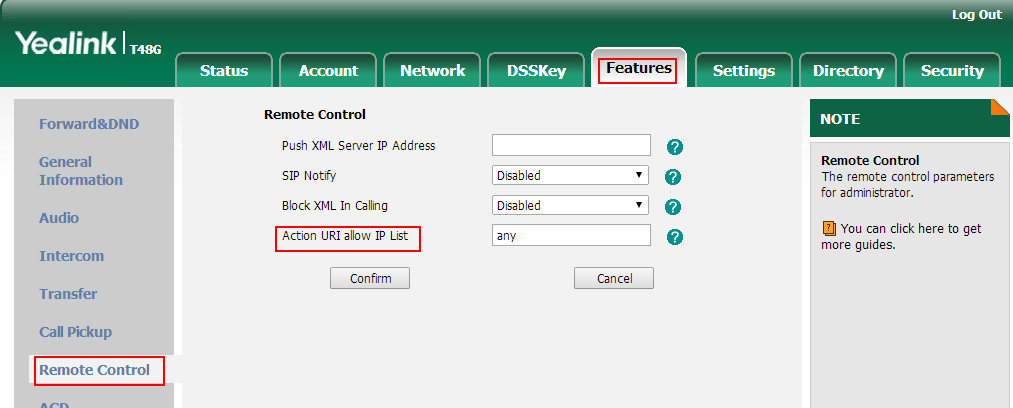
3. In the Brower, fill ‘http://PhoneIP/screencapture’ in the address bar (Phone IP is the IP address of your phone), then press ‘Enter’ key.

4. In the first time, for security consideration, the phone will display a message ‘
Allow remote control’. Please press ‘OK’. Then repeat step 3.
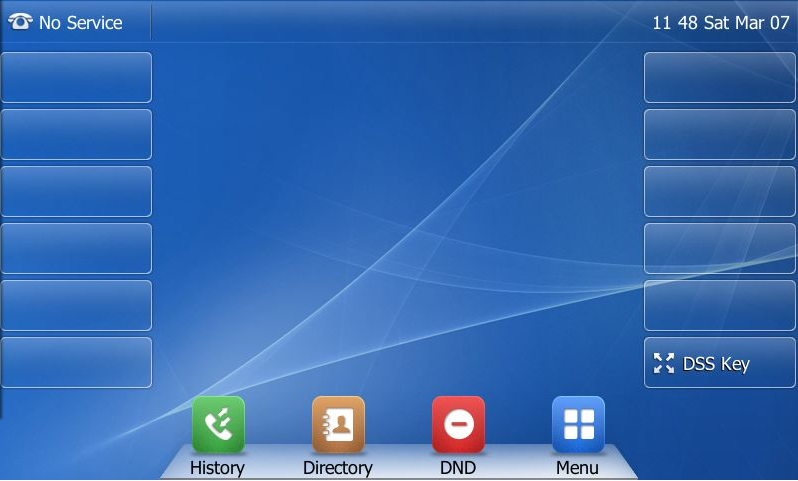
5. You will get the screen capture of the phone as below:
Models Supported:
SIP VP-T49G , SIP-T48G , SIP-T46G , SIP-T42G , SIP-T41P , SIP-T40P , SIP-T29G , SIP-T27P , SIP-T23G , SIP-T23P , SIP-T21(P) E2 , SIP-T19(P) E2 , VP530 , SIP-T38G , SIP-T32G , SIP-T28P , SIP-T26P , SIP-T22P , SIP-T21P , SIP-T20P , SIP-T19
Version V73 or Higher
Was this article helpful?
That’s Great!
Thank you for your feedback
Sorry! We couldn't be helpful
Thank you for your feedback
Feedback sent
We appreciate your effort and will try to fix the article