VoIP Doorbox Settings & Configurations
To set/change the default password
default user = admin
default pass = admin
Go to MAINTENANCE > ACCESS Tab
Select the admin user at bottom of screen
Click MODIFY and change the password to (l8)
Click APPLY
User Settings
| User | User Level |
|---|---|
| admin | Root |
| guest | General |
Add User
| User | ||
| Password | ||
| Confirm | ||
| User Level | Root General |
User Management
| admin guest |
To SET up the SIP Configuration:
VoIP > SIP Tabs
Enter server address
Authentication user
Authentication Password
SIP User (same as Authentication User)
Click ENABLE REGISTRATION BOX
CLICK APPLY
for Cloud9Phone
SIP Line SIP 1 SIP 2
Basic Settings >>
| Status | Registered | Domain Realm | |
| Server Address | Proxy Server Address | ||
| Server Port | Proxy Server Port | ||
| Authentication User | Proxy User | ||
| Authentication Password | Proxy Password | ||
| SIP User | Backup Server Address | ||
| Display Name | Backup Server Port | ||
| Enable Registration >>Click ON >>>>>>>>>>>>>> | Server Name |
SIP Line SIP 1 SIP 2
Basic Settings >>
| Status | Registered | Domain Realm | |
| Server Address | accountname.21757.service | Proxy Server Address | 21757.hpbx.outboundproxy.com |
| Server Port | 5060 | Proxy Server Port | |
| Authentication User | 3103 (ext user) | Proxy User | |
| Authentication Password | password | Proxy Password | |
| SIP User | 3103 (ext user) | Backup Server Address | |
| Display Name | Backup Server Port | 5060 | |
| Enable Registration >>Click ON >>>>>>>>>>>>>> | Server Name |
Codecs Settings >>
Advanced SIP Settings >>
SIP Global Settings >>
To Program the NUMBER TO CALL when the Doorbox Button is Pressed
DOORPHONE > FUNCTION KEY Tabs
Program DSS Key 1 as follows:
TYPE = HOTKEY
Number1 to the Extension or Cloud Ext for the Doorbox to speed dial out to extension for Group Ringing, etc.
Function Key Settings
| Key | Type | Number 1 | Number 2 | Line | Subtype |
|---|---|---|---|---|---|
| DSS Key 1> Choose HOT KEY>> | None Hot Key Line Key Event | SIP1 SIP2 | None Speed Dial Intercom | ||
| DSS Key 2 | None Hot Key Line Key Event | SIP1 SIP2 | None Dial Release OK Handfree | ||
| DSS Key 3 | None Hot Key Line Key Event | SIP1 SIP2 | None Dial Release OK Handfree | ||
| DSS Key 4 | None Hot Key Line Key Event | SIP1 SIP2 | None Dial Release OK Handfree |
To Program The Door Box to Work with the Door Lock
DOORPHONE > DOORPHONE Tab
Program the Open Duration for the amount of secs to activate door contact
Program Remote Password DIGIT to Press when you want to activate the Door Unlock
Program Door Unlock Indication to Short or Long Beeps
EGS Settings
| Open Duration | (3-10 seconds) | Talk Duration | (20-600 seconds) |
| Remote Password | Local Password | ||
| Door Unlock Indication | Silent Short Beeps Long beeps | Keypad Mode | Password Only Dial and Password |
| Description | Enable Access Table | Disable Enable | |
| Enable Touchpad | Disable Enable | Enable Card Reader | Disable Enable |
| Dial Mode Select | Main-Secondary Day-Night | Time of Switch | (5-50) |
| Day Start Time | (00:00-23:59) | Day End Time | (00:00-23:59) |
| Number | Access Code | Name | Position | Department | ID | Access Type |
|---|
Add Access
| Number | ||
| Access Code | ||
| Name | ||
| Department | ||
| Position | ||
| ID | ||
| Access Type | Guest Host |
Access Management
SUBSCRIBE PERIOD
VOIP > SIP
Subscribe Period change from 3600 to to 120 secs
SIP Line SIP 1 SIP 2
Basic Settings >>
Codecs Settings >>
Advanced SIP Settings >>
| SIP Encryption | Enable Auto Answer | ||
| SIP Encryption Key | Auto Answer Timeout | second(s) | |
| RTP Encryption | Enable Session Timer | ||
| RTP Encryption Key | Session Timeout | second(s) | |
| Subscribe Period >make 120 | second(s) | Registration Expires | second(s) |
| Keep Alive Type | Disabled SIP Option UDP | Keep Alive Interval | second(s) |
| User Agent | Server Type | COMMON NET2PHONE BOTE NORTEL MITEL MS_RP CONFIG FUJITSU SOFTX3000 BroadSoft Karel UCAP Cellcom 3CX | |
| DTMF Type | In-band RFC2833 SIP_INFO AUTO | RFC Protocol Edition | RFC2543 RFC3261 |
| DTMF SIP INFO Mode | Send 10/11 Send */# | Local Port | |
| Ring Type | Default Type 1 Type 2 Type 3 Type 4 Type 5 Type 6 Type 7 Type 8 Type 9 User 1 User 2 User 3 | Anonymous Call Edition | None RFC3323 RFC3325 |
| Enable Rport | Keep Authentication | ||
| Enable PRACK | Ans. With a Single Codec | ||
| Enable Long Contact | Auto TCP | ||
| Convert URI | Enable Strict Proxy | ||
| Dial Without Registered | Enable GRUU | ||
| Ban Anonymous Call | Enable Displayname Quote | ||
| Enable DNS SRV | Enable user=phone | ||
| Enable Missed Call Log | Click To Talk | ||
| Transport Protocol | UDP TCP TLS | Use VPN |
To set the DOOR BOX to AUTO ANSWER WHEN YOU CALL IT'S EXTENSION
PHONE >FEATURES
Enable Auto Answer should be Clicked ON
Auto Answer Timeout set to 5 secs (this is the amount of time it will wait before auto answering when you call it's extension)
Feature Settings
| DND (Do Not Disturb) | Ban Outgoing | ||
| Enable Silent Mode | Accept Any Call | ||
| Enable Intercom | Enable Intercom Mute | ||
| Enable Intercom Tone | DND Return Code | 404(Not Found) 480(Temporarily Not Available) 486(Busy Here) 603(Decline) | |
| Reject Return Code | 404(Not Found) 480(Temporarily Not Available) 486(Busy Here) 603(Decline) | Busy Return Code | 404(Not Found) 480(Temporarily Not Available) 486(Busy Here) 603(Decline) |
| Enable Auto Answer | Auto Answer Timeout | second(s) | |
| Push XML Server | Active URI Limit IP | ||
this
d
d
d
d
d
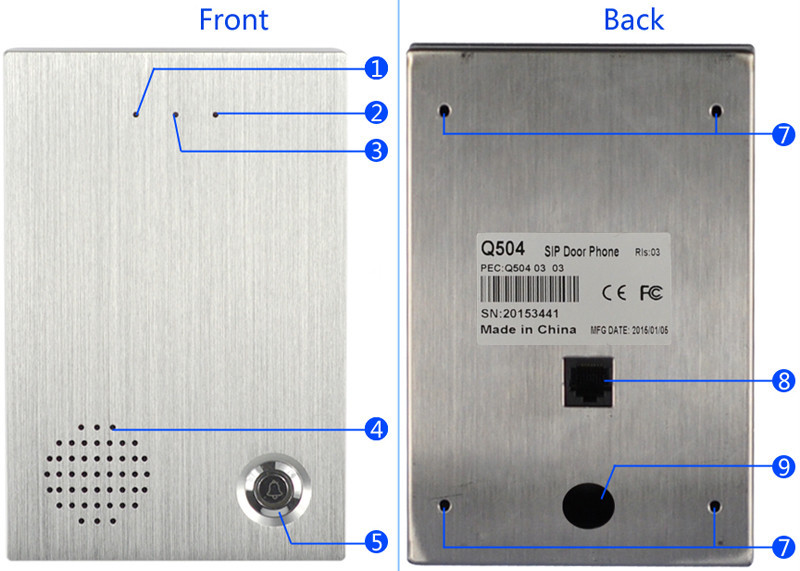
| 1 | Indicator | Flash while powering up, Lights up during conversation |
| 2 | Broadcast | Use stick to press and hold for 5 seconds,Door phone will broadcast the IP address. |
| 3 | Mic | Microphone |
| 4 | Speaker | Water proof Speaker |
| 5 | Bell button | Bell button/DSS key |
| 6 | - | - |
| 7 | Mounting hole | Mounting hole for hardware installation |
| 8 | Network interface | RJ 45 Network interface |
| 9 | Wire in hole | Knock off this sheet to let Door lock cable in |
Was this article helpful?
That’s Great!
Thank you for your feedback
Sorry! We couldn't be helpful
Thank you for your feedback
Feedback sent
We appreciate your effort and will try to fix the article