Per-Device Provisioning Passwords (PDP) add an authentication layer to the phone provisioning process. Each phone on the SkySwitch platform is assigned a unique username and password that it must present when requesting its configuration file from the provisioning server (NDP). This measure prevents unauthorized parties from downloading configuration files — even if they know a device's MAC address.
How It Works
Initial Setup (First-Time Provisioning)
- A phone boots up and requests its configuration file from the NDP provisioning server for the first time.
- Since the phone does not yet have PDP credentials, NDP serves the configuration without the device having to provide authentication.
- The configuration file delivered to the phone includes the newly generated PDP credentials (
auth_userandauth_pass). The phone stores these credentials locally. - NDP requires the phone to provide credentials when fetching its config in all future requests.
What this looks like in NDP and PBX Portal
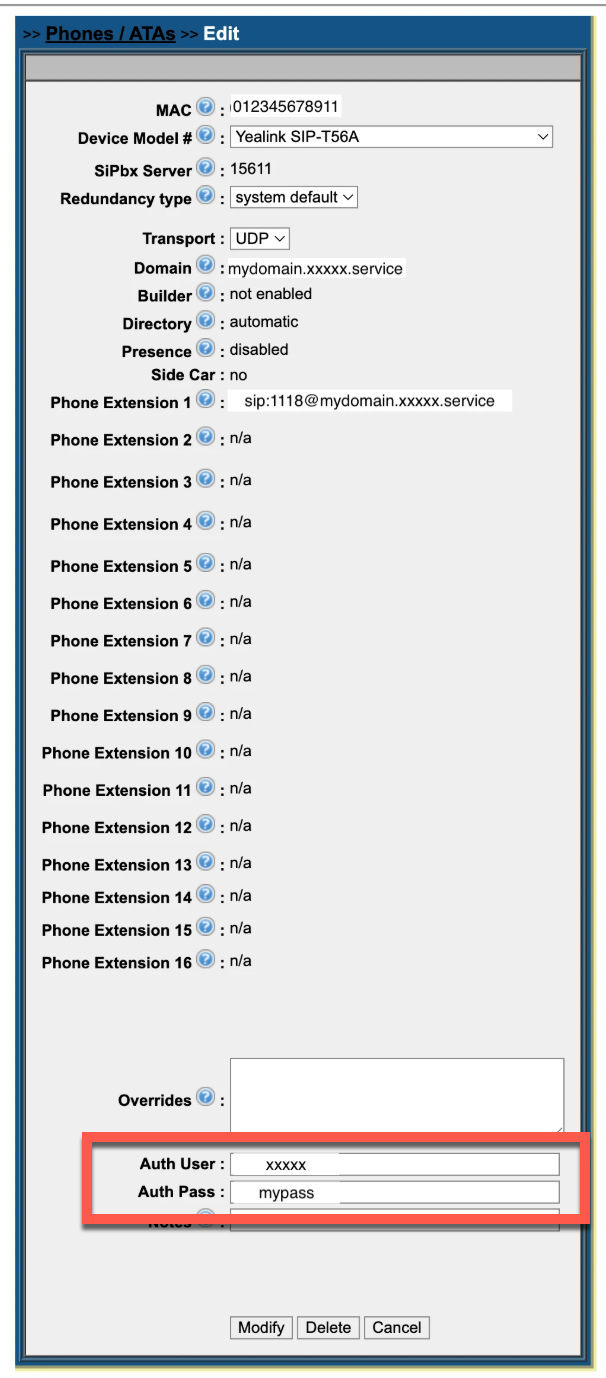
Each phone's configuration record in NDP contains two fields that control PDP:
- auth_user — the unique username assigned to the device.
- auth_pass — the unique password assigned to the device.
Note: Click either of the images below to enlarge.

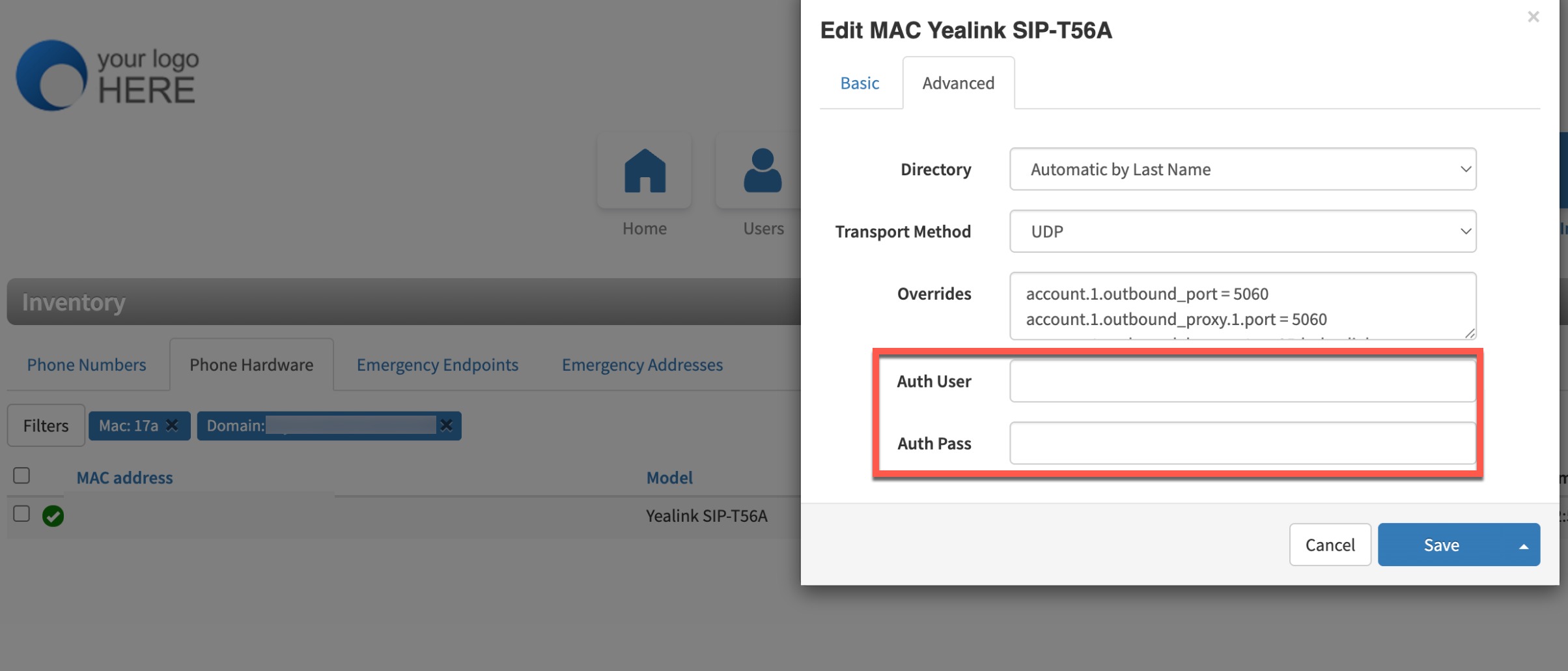
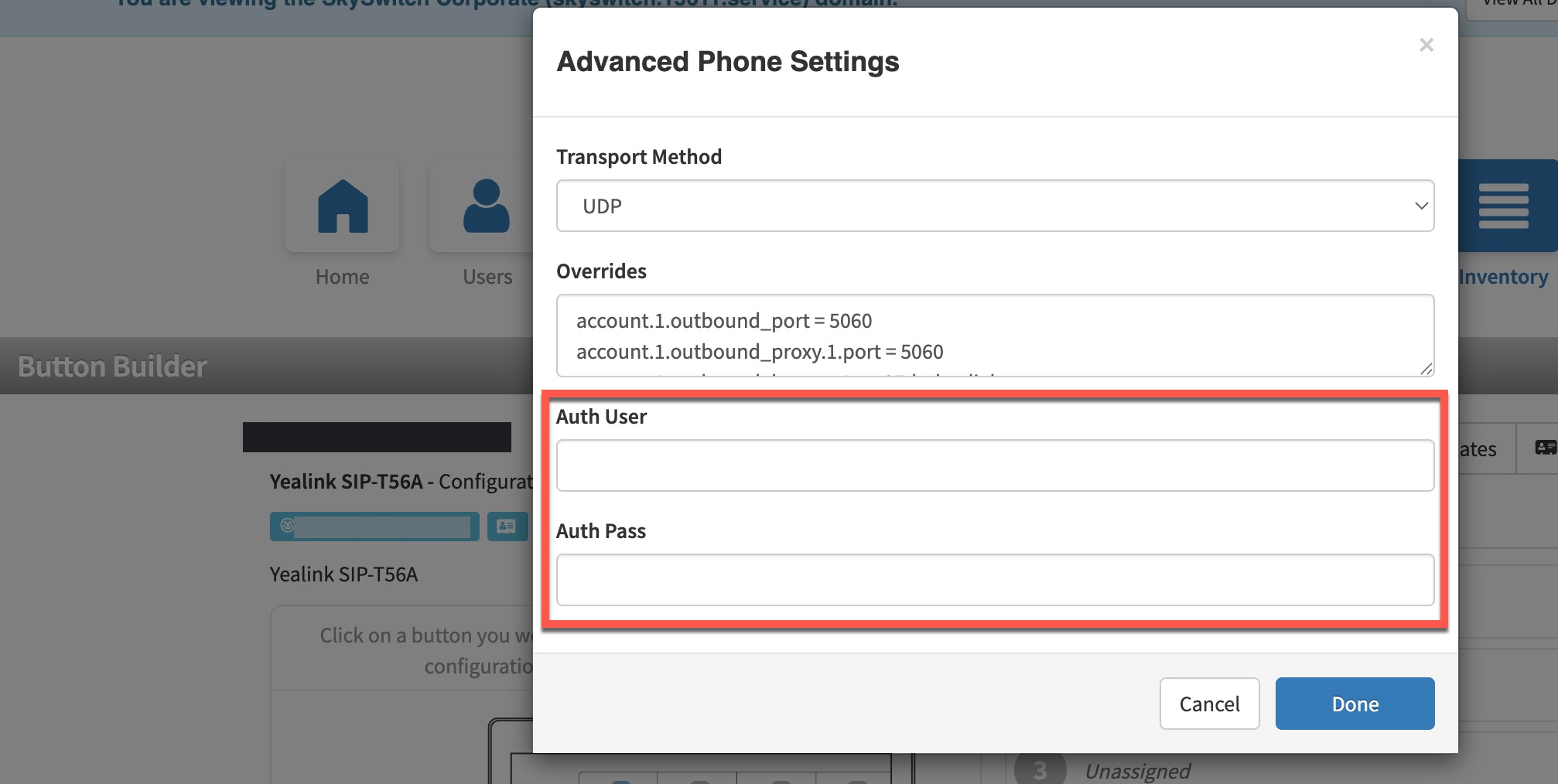
Additionally, the auth user and password can be viewed and edited from the PBX Portal (Inventory Tab), as seen in the images below.
Key Technical Details
- Credentials are per-device - Every phone gets its own unique username/password combination. There are no shared or domain-level provisioning passwords.
- Credentials are generated automatically - The SkySwitch fraud prevention system generates and assigns PDP credentials — no manual configuration is required.
- PDP is separate from SIP registration credentials - The username and password used to authenticate configuration file requests are completely independent from the credentials the phone uses to register with the PBX. Changing one has no effect on the other.
- Gradual rollout - Credentials are assigned to a small percentage of devices each day, allowing SkySwitch to monitor for any issues before expanding to the full device population.
Frequently Asked Questions
General FAQs
Do I need to do anything to enable PDP for my customers' phones?
No. PDP is enabled automatically by SkySwitch. Credentials are generated and applied without any action from partners or end users.
Will my customers experience any disruption when PDP is enabled on their phones?
No. The process is seamless. The phone receives its PDP credentials as part of a normal configuration pull. There is no reboot required, no downtime, and no change in phone behavior from the end user's perspective.
How do I know if a phone has PDP enabled?
In the NDP portal, the phone's configuration record will show values in the auth_user and auth_pass fields. If these fields are empty, PDP has not yet been applied to that device.
Provisioning Scenario FAQs
What happens when a new phone is added to the platform?
New phones will receive PDP credentials during their initial configuration pull, just like existing phones.
What happens if a phone is factory reset?
After a factory reset, the phone will no longer have its stored PDP credentials. The Partner should remove the auth_user and auth_password defined on the device in NDP. On its next provisioning request, NDP will detect that the phone does not have auth credentials defined and will go through the established process of serving the phone the config the first time containing the auth credentials it should use in subsequent requests.
What happens if a phone is moved to a different domain or subscriber?
The phone's PDP credentials are tied to its MAC address in the phones_config table, not to a specific subscriber or domain. If the phone's phones_config record is updated (e.g., reassigned), the existing PDP credentials will continue to work unless they are explicitly cleared or regenerated.
Troubleshooting FAQs
Can I manually set or change a phone's PDP credentials?
The auth_user and auth_pass fields are visible in the NDP phone configuration editor, but they are managed automatically by the SkySwitch platform. You may manually change them but it is not recommended, as it may cause the phone to lose the ability to authenticate on its next configuration pull as the change in NDP must be performed in conjunction with manually entering the new credentials into the phone.
Security FAQs
What threat does PDP protect against?
PDP protects against unauthorized configuration file downloads. Even prior to PDP, the SkySwitch fraud detection system's heuristics were actively protecting configuration files. This means that even if an attacker had previously guessed a phone's MAC address and provisioning server, the fraud system was still evaluating and often blocking those requests.
PDP adds a complementary layer of defense at the protocol level: with PDP enabled (meaning first-time provisioning has already been completed), knowing the MAC address alone is not enough — the attacker must also present the device's unique password. Together, the heuristic-based fraud detection and PDP provide defense in depth against provisioning-based attacks.
Does PDP replace the existing fraud detection system?
No. PDP works alongside the existing fraud prevention measures. The SkySwitch platform continues to monitor provisioning requests for suspicious patterns (e.g., scanning activity, geographic anomalies, unusual user agents). PDP adds a complementary layer of defense by requiring authentication at the protocol level.