This is in regards to Polycom and Yealink Multicast Paging Setting
By default Polycom VVX phones want to use Channel-1 for Group-1, Channel-2 for Group-2, etc.
By default Yealink will use Channel-0 for all Groups
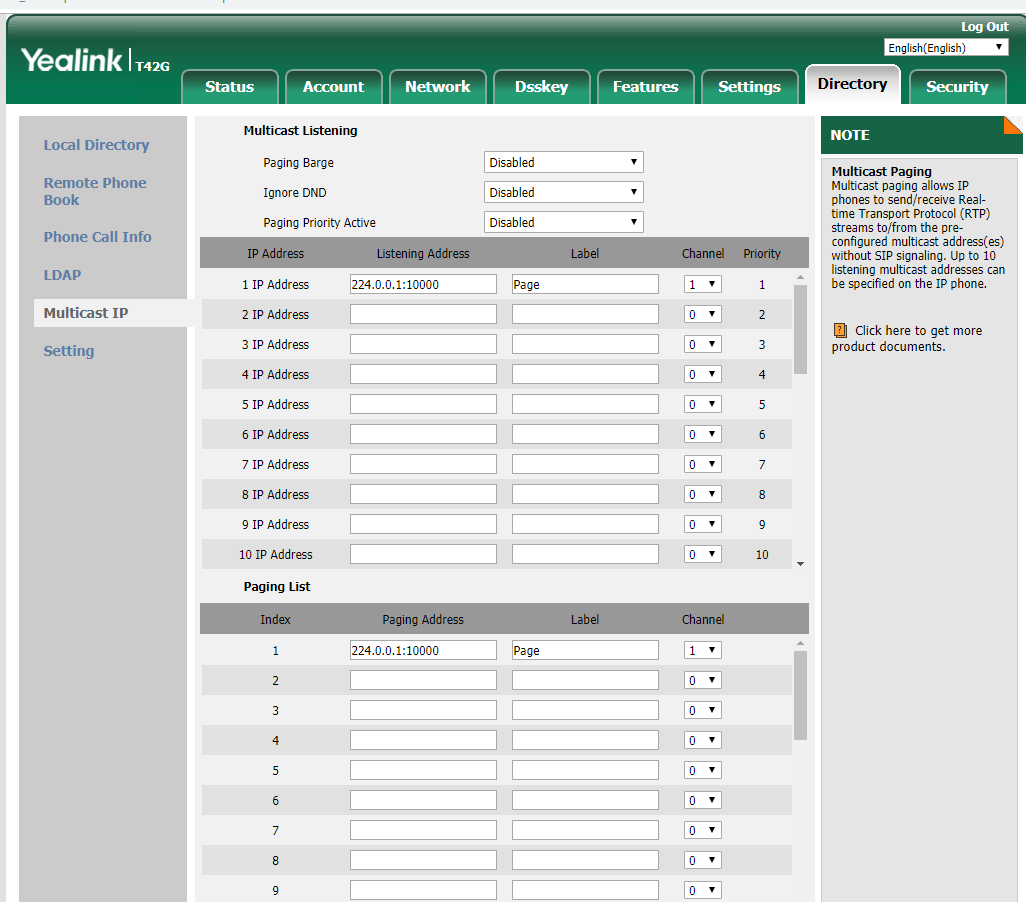
If you have a mix of Polycom & Yealink phones at the same LAN and want to use Multicast Paging you must change the YEALINK channel to match the Polycom for it to work.
You can not assign channel 0 to the Polycom phones. They will use channel-1 for Group-1, Channel-2 for Group-2, etc. But there is NO channel 0 to be assigned and the default channel for Polycom is 1
Set the channel to 1 for the Yealink to match Polycom such as:
### Paging Address ###
multicast.paging_address.1.label="Page"
multicast.paging_address.1.ip_address="224.0.0.1:10000"
multicast.paging_address.1.channel="1"
### Listen Address ###
multicast.listen_address.1.label="Page"
multicast.listen_address.1.ip_address="224.0.0.1:10000"
multicast.listen_address.1.channel="1"
========================================================
The below shows the Yealink being changed to match the Polycom
Normally the Yealink code for multicast paging channel is as follows:
multicast.paging_address.1.channel=
multicast.listen_address.1.channel=
because there is no entry it will default to channel 0 which the Polycom does not have, so we change the Yealink as below.
FULL Override Templates are available in our support portal, see
========================================================
POLYCOM VVX601
### PAGING ###
<!-- Default address 224.0.1.116 Default port 5001 -->
ptt.address="224.0.0.1"
ptt.port="10000"
ptt.pageMode.enable="1"
ptt.pageMode.defaultGroup="1"
ptt.pageMode.group.1.label="All Page"
ptt.pageMode.group.2.label="Sales"
ptt.pageMode.group.1.subscribed="1"
ptt.pageMode.group.2.subscribed="1"
feature.nonVolatileRingerVolume.enabled="1"
np.normal.ringing.toneVolume.chassis="1000"
np.normal.alert.messageWaiting.tonePattern="silent"
==============
YEALINK T42G
### Multicast CODEC PCMU - G722 this is not applicable to SIP-T19(P) E2 IP phones ###
multicast.codec="PCMU"
multicast.receive_priority.enable="0"
multicast.receive_priority.priority="0"
### Paging Address ###
multicast.paging_address.1.label="Page"
multicast.paging_address.1.ip_address="224.0.0.1:10000"
multicast.paging_address.1.channel="1"
### Listen Address ###
multicast.listen_address.1.label="Page"
multicast.listen_address.1.ip_address="224.0.0.1:10000"
multicast.listen_address.1.channel="1"
==============================
Change via web gui on Yealink
Was this article helpful?
That’s Great!
Thank you for your feedback
Sorry! We couldn't be helpful
Thank you for your feedback
Feedback sent
We appreciate your effort and will try to fix the article