See this link below to Factory Default Phone:
FIRMWARE 11.3.2 8/20/2020
How to Factory Default Cisco 8811 8841 7751 8861 Phones by Fred
Reset the Phone to the Factory Settings from the Phone Keypad
You can reset the phone to the factory settings. The reset clears all the phone parameters.
Procedure
| Step 1 | Remove power from the phone in one of these ways:
| ||
| Step 2 | Wait 5 seconds. | ||
| Step 3 | Press and hold # and plug the phone back in. | ||
| Step 4 | When the Headset and Speaker buttons are lit, release # and enter the following key sequence: (needs to be done FAST !) 123456789*0# The light for the Headset button turns off after you press the 1 key. After you enter the key sequence, the Mute button lights.
|
it is key to keep holding the # until the headset and speaker lights comeback on.
see youtube video if available
How to Factory Reset Cisco 8800 IP Phones - Webex Calling - YouTube
==============================================
Here are Domain Level Overrides that I suggest, SR 12/18/2019
This short list must be added to the domain or phone BUT the longer more comprehensive list is recommended.SR
+++++++++++++++++++++++++SHORT LIST OF MUST ++++++++++++++++++++++++++++++++
Programmable_Softkey_Enable="Yes"
Connected_Key_List="hold|1;endcall|2;xfer|3;conf|4;showvideo;bxfer;confLx;xferLx;park;phold;crdstart;crdpause;crdresume;crdstop;dnd;"
Default_Ring_1_="2"
Call_Pickup_Code="*35"
Group_Call_Pickup_Code="*36"
Resync_Periodic="0"
=========================MORE COMPREHENSIVE+++++++++++++++++++++++++++++++
Admin_Password="Sky649"
Programmable_Softkey_Enable="Yes"
Connected_Key_List="hold|1;endcall|2;xfer|3;conf|4;showvideo;bxfer;confLx;xferLx;park;phold;crdstart;crdpause;crdresume;crdstop;dnd;"
Default_Ring_1_="2"
Call_Pickup_Code="*35"
Group_Call_Pickup_Code="*36"
Back_Light_Timer="Always On"
Boot_Display="Text"
Text_Logo="SONICTEL"
Default_Ring_1_="2"
Call_Pickup_Code="*35"
Group_Call_Pickup_Code="*36"
Resync_Periodic="0"
Resync_At__HHmm_="0200"
Resync_At_Random_Delay="7200"
Group_Paging_Script="pggrp=224.0.0.1:10000;name=All;num=888;listen=yes;"
Ehook_Enable="Yes"
==============================================
To UPGRADE all model 88xx series phones to 11.3.1 MPP.loads
Add these two lines to the advanced tab (NOTE you MUST add the Upgrade Error Retry Timer to 7200 from default 3600 or the upgrade will fail.)
Upgrade_Error_Retry_Delay="7200"
Upgrade_Rule="https://sonictel-prov-files.s3.us-east-2.amazonaws.com/cisco-88xx-11-3-1/sip88xx.11-3-1MPP-697.loads"
++++++++++++++++
ALERT if the current firmware is 11.0.0 or earlier, then you MUST first upgrade to 11.1.1, then to 11.3.2 in steps
Phone Has a Firmware Build Earlier than 11.0.0
Sometimes, a phone taken out of the box has a firmware build earlier than 11.0.0. When this happens, you must upgrade the firmware on your phone to 11.0.0. Then you must update to 11.1.1 or later before you provision it.
Upgrade_Error_Retry_Delay="7200"
Upgrade_Rule="https://sonictel-prov-files.s3.us-east-2.amazonaws.com/cisco-88xx-11-1-1/sip88xx.11-1-1MPP-897.loads"
Upgrade_Error_Retry_Delay="7200"
Upgrade_Rule="https://sonictel-prov-files.s3.us-east-2.amazonaws.com/cisco-88xx-11-3-2/sip88xx.11-3-2MPP0001-609.loads"
===================================
Upgrade_Error_Retry_Delay="7200"
Upgrade_Rule="https://sonictel-prov-files.s3.us-east-2.amazonaws.com/cisco-88xx-11-3-1/sip88xx.11-3-1MPP-697.loads"
===================================
The provisioning string for Cisco 8811 8841 8851 8861 Models
http://sipcfg.io/cfg/spa$MA.cfg
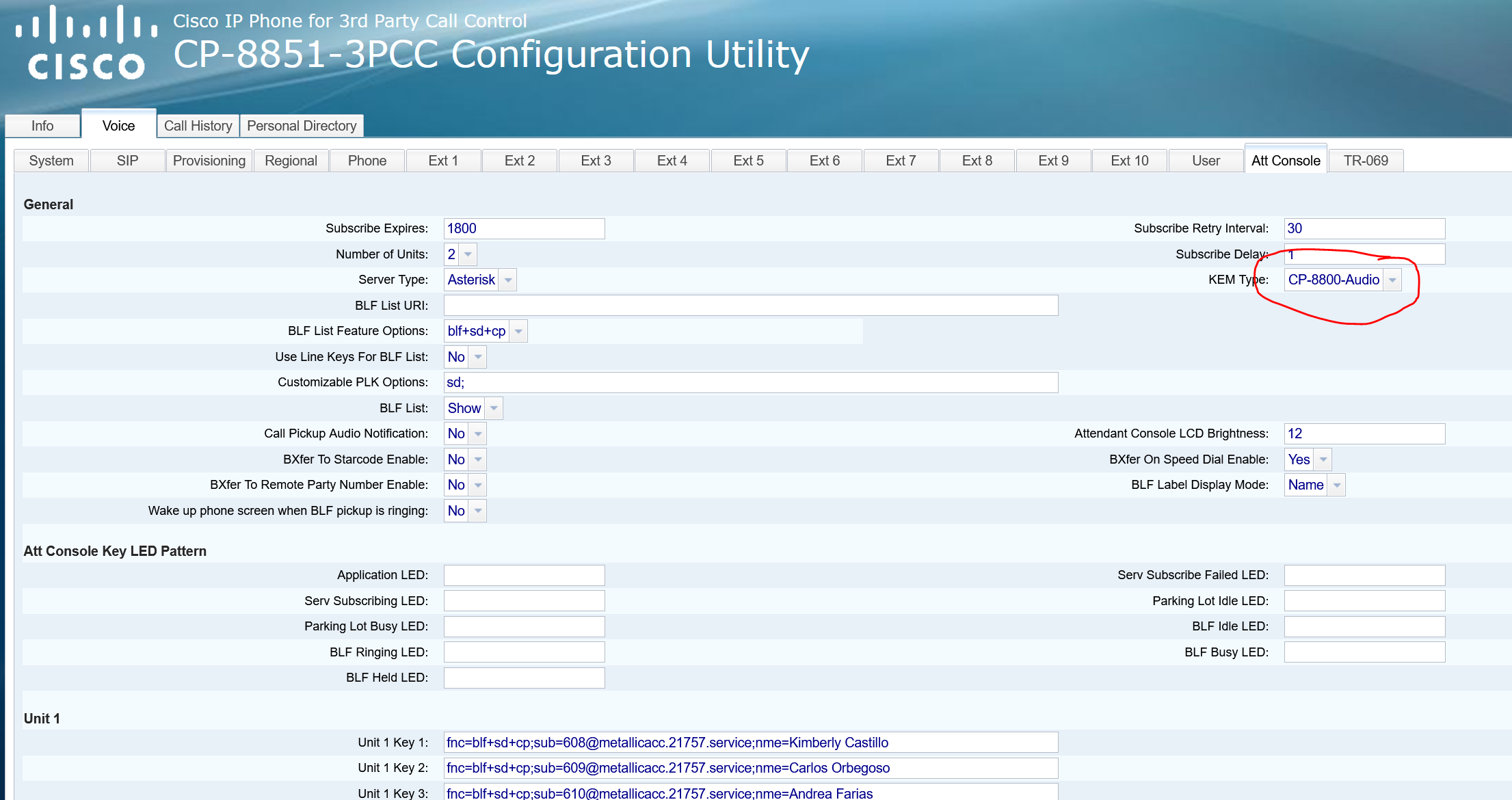
NOTE: Cisco has discontinued the OLD Sidecar BKEM and replaced it with the NEW AKEM model. This requires you to change the setting in the Cisco 8851 to CP-8800-Audio.
this is the template to add to the ADVANCED TAB
KEM_Type="CP-8800-Audio"
This is the Phones web gui to change
Was this article helpful?
That’s Great!
Thank you for your feedback
Sorry! We couldn't be helpful
Thank you for your feedback
Feedback sent
We appreciate your effort and will try to fix the article