If client is complaining of weird telephone ringing BUT no call come through, they may be getting hot by a SIP Scanner / SIP Vicious.
This works with SS
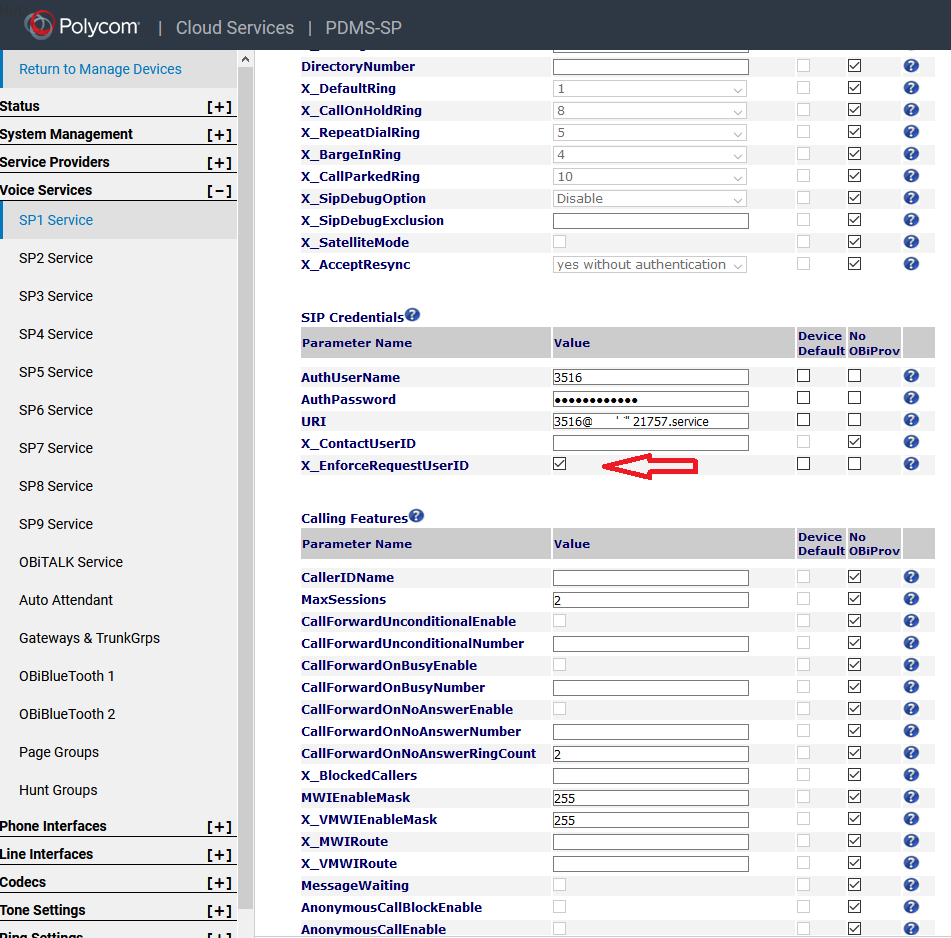
A more fool-proof method is to enable the parameter: X_EnforceRequestUserID. This parameter is under SPn in the SIP Credentials section. What this does, is it makes sure the incoming INVITE has a User ID that matches the User ID of your SIP service account. If it does not match, the INVITE will be rejected and the phone will not ring. Enabling this parameter will maintain normal voice service as well as block SIP scanners.
To stop this we will Select X_EnforceRequestUserID under VOICE SERVICES > SP1 Service > SIP Credentials
NOTE: This must be done for each line (SP1 Service, SP2 Service, SP3 Service, etc.)
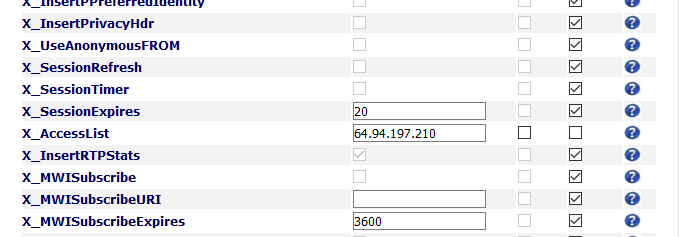
The old way we used with CD, still in use on some devices as of 1/13/2020
To stop this, we will enter OUR SIP Feature Server as the only trusted source for external IP Address.
- Log into Obitalk
- Access the Device
- Service Providers (left tabs)
- ITSP Profile A SIP
- goto X_Accesslist ( enter the CD feature server IP address here )
- Save & test
Was this article helpful?
That’s Great!
Thank you for your feedback
Sorry! We couldn't be helpful
Thank you for your feedback
Feedback sent
We appreciate your effort and will try to fix the article