How to set up Obihai ATA to Off Hook Auto Dial
https://support.8x8.com/equipment-devices/phones/ata-adapters/how-to-set-up-obihai-off-hook-autodial
In the PHONE PORT Section
Normal Default Setting:
([1-9]x?*(Mpli)|[1-9]S9|[1-9][0-9]S9|911|**0|***|#|##|**70(Mli)|**8(Mbt)|**81(Mbt)|**82(Mbt2)|**1(Msp1)|**2(Msp2)|**3(Msp3)|**4(Msp4)|**9(Mpp)|(Mpli))
Change to this for the off-hook auto dial, where the 801 is the ext or ring group to auto-dial
(<S1:801>)
Sx (x = seconds to wait before auto dial)
S1 = 1-sec
yyyy = ext to auto dial
yyyy = as an example 801 (for ring group)
So wait one sec and auto dial ext-801
(<S1:801>)
============================================================================
In the PHONE PORT Section
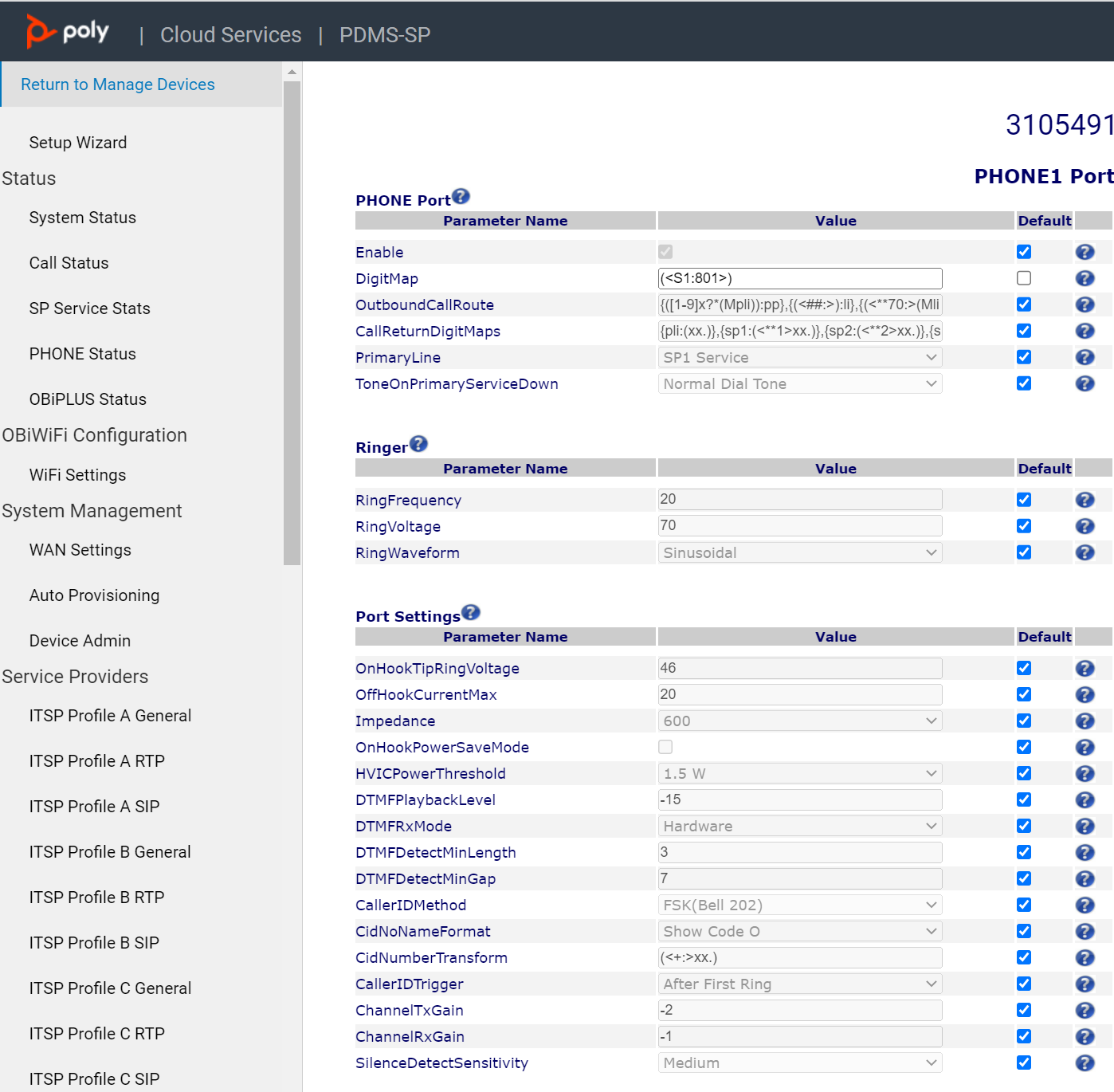
============================================================================
Digit Map Configuration
Digit Map Rules and Elements
A digit map serves to transform and restrict the number that may be dialed or called, and determine if sufficient digits have been dialed by the user to form a complete number. Each map is composed of one more rules surrounded by parentheses (which MUST NOT be omitted). Here is the general format of a digit map:
(rule|rule|….|rule)
A digit map rule is a rule for matching a given sequence of digits. It may contain extra white spaces for readability; all spaces are removed by the OBi device during parsing. A rule may contain one or more of the following elements:
§ literals - Any combination of 0-9,*,#,+,-,A-Z,a-z, except m, M, s, S, x, X which have special meaning in the digit map syntax. It matches digit sequences with exactly the same literals
§ ‘literals’ - Everything inside a pair of single quotes is treated as a literal except for the single quote (‘) character.
§ x - a wild card digit that matches any digit from 0-9. x is CASE SENSITIVE
§ x. - matches 0 or more x
§ [123-7] or [135] - A set of 1 or more digits surrounded by pair of [ ]. It matches any digit in the set. The – syntax represents an inclusive digit range, such as 0–9, 3–7. So [123–7] is equivalent to [1–7] or [1234567]
§ S, S0, S1, S2, …S9 - Digit timer of 0, 1, 2, …,9 seconds respectively; S is equivalent to S1; S0 is the same as “blank”. You can concatenate multiple S elements together if you need more than 9s timeout, such as S9S5 for a 14s timeout. S is CASE SENSITIVE. It should only be used either as the first element of a rule for hot/warm line implementation, or as the last element of a rule as a means of overriding the default interdigit timer
§ <elements:literals> - Substitute the digit sequence matching elements with the given literals. Single quote syntax is NOT needed or allowed for the literals in this context; special characters may be used here as they do not apply in this context either. Elements can be empty, in which case the ‘:’ may be omitted. This case is useful for inserting some extra digits in certain part of the dialed digits. The literals part can be empty also but the ‘:’ MUST NOT be omitted. This case is useful for removing part of dialed digits. Elements and literals MUST NOT be both empty.
§ (map) – An embedded digit map for matching subsequent digits.
§ (Mlabel) – A named embedded digit map for matching subsequent digits, where label is one of abbreviated terminal names. Possible choices are:
o (Msp1) for SP1 Service::DigitMap
o (Msp2) for SP2 Service::DigitMap
o (Msp3) for SP3 Service::DigitMap
o (Msp4) for SP4 Service::DigitMap
o (Mpp) for OBiTALK Service::DigitMap
o (Mli) for LINE Port1::DigitMap
o (Mph) for PHONE Port::DigitMap
o (Mph2) for PHONE2 Port::DigitMap
o (Maa) for Auto Attendant::DigitMap
o (MtgN) for TrunkGroupN::DigitMap, N=1,2,3,4
o (MvgN) for VoiceGatewayN::DigitMap, N=1,2,3,4,5,6,7,8
Starting with release 1.2, the following elements are added:
§ X – A wildcard digit that matches 0–9 or *. This is equivalent to [x*] or [0-9*x]
§ @ – A wildcard character that matches any alphanumeric character except #
§ x? – matches 0 or 1 x
§ @? – matches 0 or 1 @
§ [^…] – matches any single alphanumeric character that is not in the set
§ Allow alphanumeric and wildcard inside a set [ ], such as [x], [X#], [@#], [a-zA-Zx]
The last two elements imply that the OBi digit maps are recursive. Recursive digit maps allow digit maps to be re-used and make their specification more compact and readable. It is important that you do not specify digit maps that lead to infinite recursion. For example, a digit map must not include a named embedded digit map that references itself.
To bar users from calling numbers that match a rule, add a ‘!’ in front of that rule in the digit map. The rule is then referred to as a barring rule.
Let’s look at some examples.
1408xxxxxxx – Matches any 11-digit number that starts with 1408
011xx. – Matches any number that starts with 011 followed by one or more digits
<1408>xxxxxxx – Matches any 7-digit number. OBi pre-pends 1408 to the number when making the call
<:1408>xxxxxxx – Equivalent to the last example
<+>1xxxxxxxxxx – Pre-pends ‘+’ to any 11-digit number that starts with 1
<**1:>1408xxxxxxx – Matches any number that starts with **11408 followed by 7 digits. OBi removes the **1 prefix when making the call
*74(x|xx) – Matches any number that starts with *74, followed by 1 or 2 digits
**1(Msp1) – Matches any number that starts with **1 and with the rest of digits matching the DigitMap in the SP1 Service
<:1234> – Matches an empty phone number and replaces with 1234. This is the syntax for a hotline to 1234
<S0:1234> – Equivalent to the last example
<:#> – Hotline to the number #
<S0:#> – Equivalent to the last example
<S4:1234> – Call 1234 if no digits entered for 4s. This is the syntax of a warm line.
xx.853 7683 – Matches any number with at least 8 digits and ends with 8537683, such as 15108537683, 98537683
(x.408 223 1122) – Matches any number with at least 10 digits and ends with 408 223 1122, such as 4082231122, 1408 223 1122
xx.<#> – Adds a # to the end of any number with 1 or more digits
!1900xxx xxxx – Barring all 11-digit numbers that start with 1900
[^*]@@. – Arbitrarily long alphanumeric sequence (except #) that does not start with *
xx? – one or two-digit number
(1xxxxxxxxxxS0|xx.) – Arbitrarily long digit sequence not starting with 1; otherwise it is limited to 11 digits
Matching Against Multiple Rules in Digit Map
One important function of a digit map is to determine if sufficient digits have been entered by the user during dialing. A digit map normally contains more than one rules. The Digit Map Processor (DMP) must return the best matched rule at some point, or declare the input digit sequence is invalid. The DMP keeps refining its decision as each digit is entered until it reaches a final decision, or will be forced to make a timely decision when the interdigit timer expires.
The DMP restarts the interdigit timer on every newly entered digit. The duration of this timer can be either long or short. The long and the short timer values are set to 10s and 2s respectively by default and are configurable per phone port via the DigitMapLongTimer and DigitMapShortTimer parameters respectively (execpet on OBi100/OBi110 where the two timer values are not configurable). Whether to use the long or short interdigit timer depends on the current rule matching states. The DMP maintains a matching state for each rule in the digit map as it processes each input digit. The following states are defined:
- Partially Matched (PM) – The rule partially matches the accumulated input sequence. Initially all rules are in this state before any digit is entered. Rules in this state have the potential of becoming EM or IM as more digits are entered. Example: 1234 partially matches the rules xxxxxxx, 1xxxx, 1234567, <123:>xxxx.
- Exactly Matched (EM) – The rule exactly matches the accumulated input sequence. However, any further input digit will turn this rule into the MM state. Example: 1234 exactly matches the rules xxxx, 1234, 1xxx, <123:5678>x
- Indefinitely Matched (IM) – The rule matches the accumulated input sequence indefinitely, with a variable length such that the rule can potentially stay as IM as more matching digits are entered. Example: 011853 indefinitely matches the rules xx., 011xx., <011:>xx.
- Mismatch (MM) – The rule does not match the accumulated input sequence. This state will not change as more digits are entered. Example: 1234 mismatches the rules 123, 1xx, 12345
Rules in the EM or IM state are candidates to be selected by the DMP. After processing a new digit, the DMP returns a final decision if any of the following conditions holds:
1. All rules are the MM state. DMP returns an error
2. One or more rules are in the EM state with no rules in the IM state. DMP returns the best matched EM rule. If the best matched rule is a barring rule, DMP returns an error instead
Otherwise, DMP starts the short interdigit timer if there is at least one rule in the EM state, or else the long one. When the interdigit timer expires, DMP makes a timely decision by returning the best matched rule at that moment if one is found, or else a timeout error. Again if the best matched rule in this case is a barring rule, DMP returns an error instead. Note that the timer to wait for the first input digit is NOT governed by the interdigit timer, but the duration of dial tone being played and could be a lot lengthier than the long interdigit timer.
The best matched rule is the one that has the most specific literals matching the input digit sequence. For example, the input sequence 1234 matches the rule 123x better than 1xxx. On the other hand, an EM rule is always selected over an IM rule.
Finally, the default interdigit timer can be overridden by appending the Sn element at the end of the rule (n = 0–9).
Let’s look at some examples. Consider this simple digit map:
(<1408>xxx xxxx)
As soon as 7 digit have been entered, the DMP returns a complete number by pre-pending the accumulated digits with 1408.
Consider another simple map:
(xx.)
After user dials one or more digits, the DMP returns the accumulated digits as a complete number when the long interdigit timer expires.
Let’s combine the last two maps:
(xx. | <1408>xxx xxxx)
After user dials 1 or more digits but less than 7 digits, the DMP would return the accumulated digits as a complete number when the (long) interdigit timer expires. As soon as 7 digits are entered, the DMP would return 1408 followed by the accumulated 7-digit when the (short) interdigit expires. On the 8th digit and beyond, however, the DMP will consider the first rule only and return the accumulated digits as is when the (long) interdigit timer expires.
Now add a S4 timer to the 2nd rule:
(xx. | <1408>xxx xxxxS4)
In this case the DMP behaves exactly the same as the last, except that the short interdigit timer the DMP uses upon receiving the 7th digit is overridden by a 4s timer; hence the user will have up to 4s instead of 2 to dial the 8th digit.
Forcing Interdigit Timeout With A Pound(#) Key
When dialing, user may force an interdigit timeout with a # key instead of waiting for the DMP to timeout its own long or short timer. This is allowed as long as the # key does not match the current element of any PM rules. Otherwise the # key will be “swallowed” by the DMP instead of triggering a timeout.
Consider the digit map (33xx.)
If the user enters 333#, the DMP will return immediately with the number 333.
Now consider the digit map (33xx.|333#1234x.)
If the user enters 333#, the DMP will not return but continue to wait for further input or its interdigit timer to expire. Note that the first rule “33xx.” is now in the MM state since the digit # does not match “x”. The user may continue to enter 1234#, or 1234 and wait for a long interdigit timeout for the DMP to successfully return 333#1234.
Invoke Second Dial Tone in Digit Map
You can tell OBi to start a tone after a certain pattern of digits have been dialed by specifying the element {t=<tone>} within a digit map, where <tone> is a 1 to 3-letter name of the tone to play. The tone will stop when the next digit is entered. For example:
(**1{t=di2}(Msp)|**8{t=od}(Mli))
which tells the device to play Second Dial Tone when **1 is dialed, or play Outside Dial Tone when **8 is dialed. Here is a full list of acceptable (case insensitive) values of <tone>:
bu = Busy Tone
cf = Call Forwarded Dial Tone
cm = Confirmation Tone
co = Conference Tone
cw1 – cw10 = Call Waiting Tone 1-10, respectively
di = Dial Tone
di2 = Second Dial Tone
fb = Fast Busy Tone
ho = Holding Tone
od = Outside Dial Tone
pr = Prompt Tone
rb = Ringback Tone
ro = Reorder Tone (same as fast busy)
si1 – si4 = SIT TONE 1 – 4, respectively
st = Stutter Tone
0 – 9, *, #, a – d = DTMF 0 – 9, *, #, A – D respectively
Change Inter-digit Long Timer Dynamically After Partial Match
The OBi starts off with the inter-digit long timer set to the configured DigitMapLongTimer value when processing a new digit sequence by a digit map. You may change the long timer as some patterns are partially matched by embedding the syntax {L=<time>} within a rule in the digit map, where <time> is the desired number of seconds for the long timer. For example:
(011 853 xxxx xxxx{L=5}x. |xx.)
Here the long timer is shortened to 5s after the user has entered 011 853 + 8 digits. Hence the OBi will declare that a complete number is collected in 5s when no more digits are received. Without the {L=5} syntax the user will have to wait for 10s (by default) for the same to happen.
Note: This feature is not available on the OBi100/OBi110.
User Defined Digit Maps
Starting from release 1.2, there are 10 user definable digit maps available under the User Settings – User Defined Digit Maps section of the device configuration web page. These digit maps are referred to as User Defined Digit Map 1 to 10. Each user defined digit map is specified with 2 parameters:
- Label: An arbitrary string for referencing this digit map in other digit map specification. The value should be 2-16 characters long. For example, “friends”. In this case, (Mfriends) can be referenced in other digit maps, such as PHONE Port::DigitMap
- DigitMap
By default both parameters are empty, except for User Defined Digit Map 1 (see the section below).
A User Defined Digit Map For IPv4 Dialing
The default values of the parameters for User Defined Digit Map 1 are set the following values to support IPv4 Dialing:
- Label: ipd
- Digit Map: (xx.<*:@>xx?x?<*:.>xx?x?<*:.>xx?x?<*:.>xx?x?|
xx.<*:@>xx?x?<*:.>xx?x?<*:.>xx?x?<*:.>xx?x?<*::>xx?x?x?x?)
The map (Mipd) is referenced in the default setting of the DigitMap in ITSP Profile A and B. It supports the following two forms of IPv4 dialing:
a) <user-id>*<a>*<b>*<c>*<d>
b) <user-id>*<a>*<b>*<c>*<d>*<port>
where <user-id> is an arbitrary length numeric user-id, such as 100345, <port> is a port number in the range 0–65535, and each of <a>,<b>,<c>,<d> is a 1-3 digit pattern in the range 1–255 that identifies one byte of an IP address. The dialed number will be translated into <user-id>@<a>.<b>.<c>.<d> and <user-id>@<a>.<b>.<c>.<d>:<port> respectively. Here are some examples:
1234*192*168*15*113 maps to 1234@192.168.15.113
123456*192*168*15*180*5061 maps to 123456@192.168.15.180:5061
Was this article helpful?
That’s Great!
Thank you for your feedback
Sorry! We couldn't be helpful
Thank you for your feedback
Feedback sent
We appreciate your effort and will try to fix the article