Yealink WiFi Dongle WF50 requires Firmware Version V84 or higher
This is for the S series only, T42S, T46S, T48S, etc. ( no G phones ) - see WF40 below
To accomplish this you MUST add the following lines of template code to the individual phone in the ADVANCED Tab
firmware.url.server_type="https"
firmware.url="https://sonictel-prov-files.s3.us-east-2.amazonaws.com/T46S-T48S-T42S-T41S-66.84.0.15.rom"
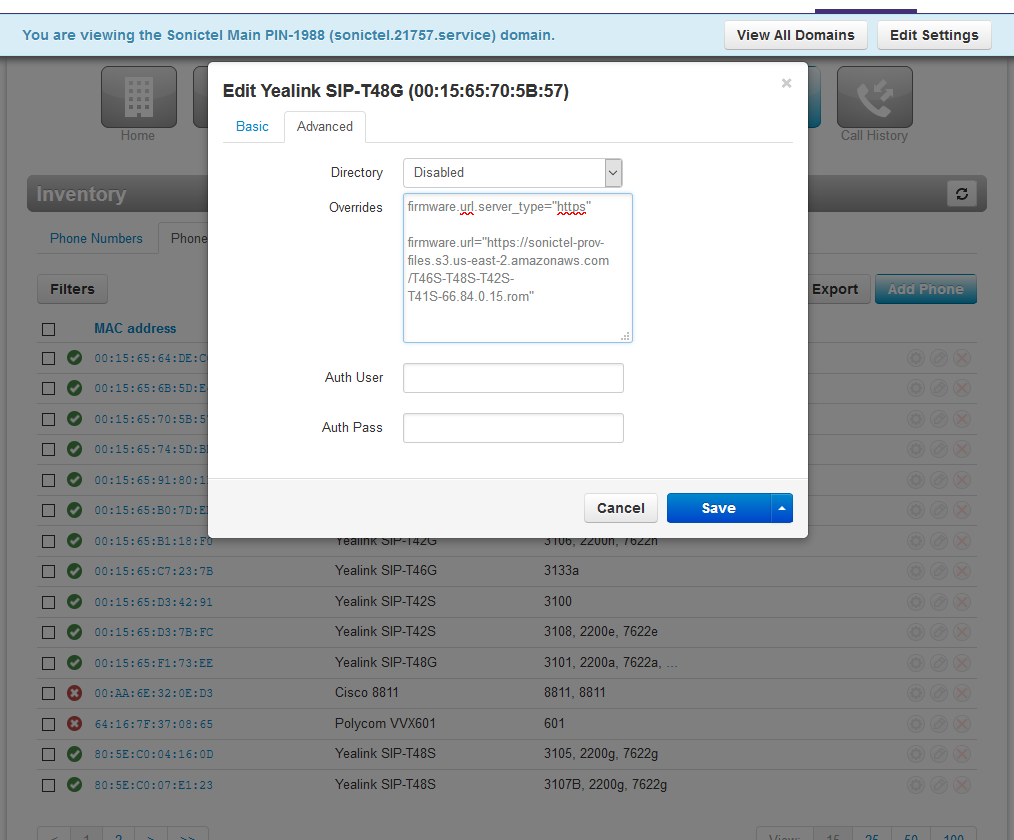
see attached for Yealink WB50 Admin Manual
NOTE for the WF40 (older WiFi Dongle)
> Supports Yealink SIP-T27G/T29G/T46G/T48G/T41S/T42S/T46S/T48S/T52S/T54S/T53
- For T48G: upgrade to the version of 35.80.0.95 or higher
- For T29G/T46G/T46S/T48S: upgrade to the version 81 or higher
- For T27G/T41S/T42S: upgrade to the version of x.81.0.110 or higher
SR
6/28/2019
Was this article helpful?
That’s Great!
Thank you for your feedback
Sorry! We couldn't be helpful
Thank you for your feedback
Feedback sent
We appreciate your effort and will try to fix the article