Music on Hold
Download a music file, and name it holdmusic.wav
holdmusic.wav
holdmusic2.wav (right-click, save linked file as...)
To roll your own, the WAV file should be: 8kHz, 16bit, mono (max. 90 seconds).
Copy holdmusic.wav either to the IP Office from Manager, using ADVANCED / EMBEDDED FILE MANAGEMENT, or directly to the System SD using a card reader. Place the file in the /system/primary folder.
Enter * 341 # from any phone to listen to the (source 1) system hold music.
Alternatively, the Manager should upload the file(s) automatically if they're placed in the Working Directory, and the built-in TFTP server is enabled (check in Preferences). You may also setup a TFTP server such as SolarWinds or PumpKIN to upload the file(s). An IP Office will automatically look for a TFTP server in the same subnet when it reboots.
In the Manager application:
- Go to System and select the Telephony tab.
- Select the sub tab Tones and Music.
- Select System Source = WAV file.
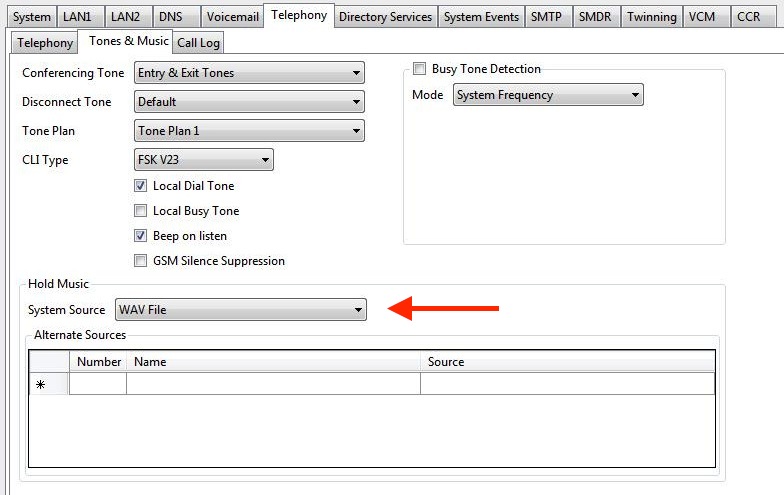
You can add up 3 additional hold music files under "Alternate Sources".
Enter * 34N # from any phone to listen hold music from source N (1 = System).
Was this article helpful?
That’s Great!
Thank you for your feedback
Sorry! We couldn't be helpful
Thank you for your feedback
Feedback sent
We appreciate your effort and will try to fix the article